support@rfktm.com (253) 267-3471 Federal Way, WA   
30 Day Free Trial    Learn more here...
$1500.00 a Year is only $125.00 a Month
No limit for the number of users.


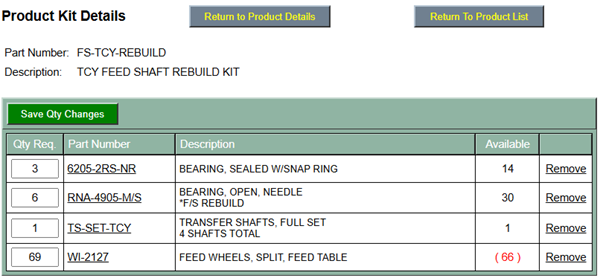
Kits are designed to indicate all required parts for a specific operation or what ever you need. Kits are best used for those who do not know everything that has to be included within a work order. This example shows many products required to replace and rebuild the feed shafts on a flexo printer.


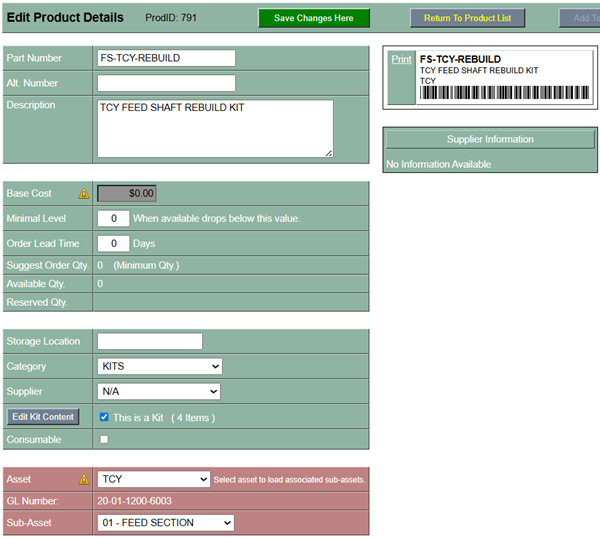
Setting up a product as a kit is very simple.

  1. Create a product.

  2. Check the box "This is a Kit". This will enable the button "Edit Kit Content".

  3. Select the Asset (optional) so it is easier to locate when searching for. Best to create a category called Kits.
 
     
Clicking the button "Edit Kit Content" will take you into this view where you can indicate all products that will be listed in this kit.

This is also a good location to verify if you have enough inventory to perform an operation before creating a work order.
 
 
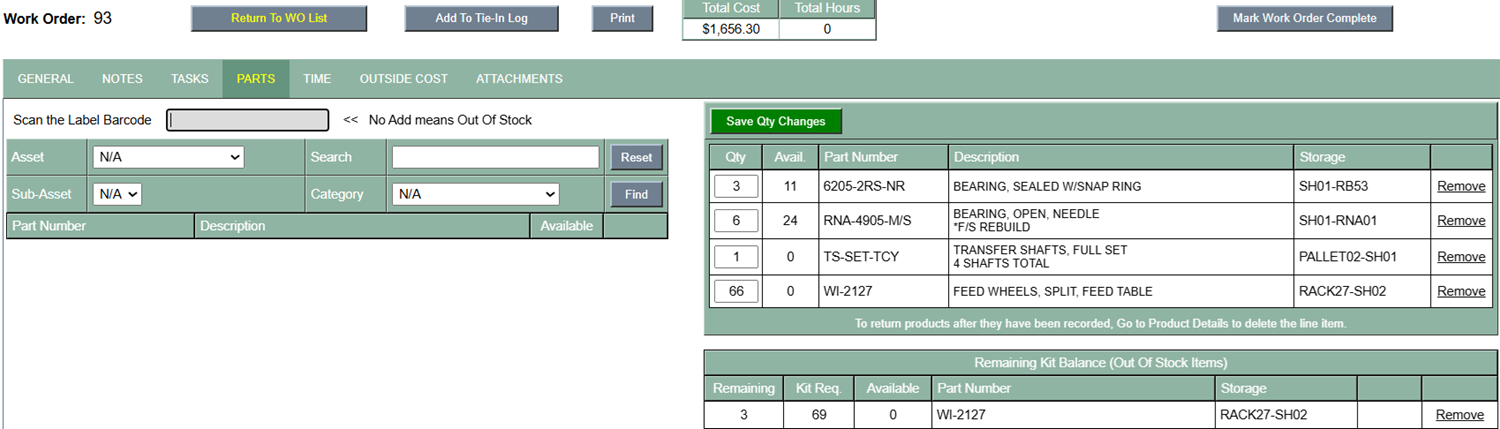
Below shows adding a kit to a work order. Simply enter the kit "Product Number" (FS-TCY-REBUILD) into the "Scan the Label Barcode" field and hit the "Enter Key". You do not have to use a scanner but you do have to enter the entire product number as it shows in the inventory.

The section below the parts list is quantity still outstanding if there is no or not enough inventory in stock. When more inventory is added, a link in the list will display allowing you to move the remaining balance up into the main parts list and it will update the quantity required.