| |
| Our work orders have much of what you will see in other CMMS applications. |
| |
| What items our work orders have over what most others don't have: |
- Internal Notes - A must have for work orders that extend over many days or months.
- Attachments with thumbnails for easy preview or icons related to the file type.
- Reason Codes for the purpose of the work order (electrical, mechanical, human error, pnuematics, etc).
- Start a timer for when you start a work order and stop when done. Sometimes you get involved and forget to check what time you started.
- Manually enter number of hours performed.
- Capture outside costs such as HVAC, one time purchased item or component, etc.
|
| |
| There is only 3 types of Reasons for the work orders. In the past, we have seen to many reasons within a CMMS and this mudded up the data results. |
| Reasons are Preventive, Breakdown and Projects |
| |
| Breakdown is used for anything that occurred that prevented production or force production to stop. |
| |
| Preventive has 2 purposes to it. |
| Preventive Proactive- This is an issue found during an inspection and you are able to schedule the repairs when the asset is not in use. |
| Preventive Scheduled PM - This is tied to Scheduled PMs for work orders that function on regular cycles. |
| |
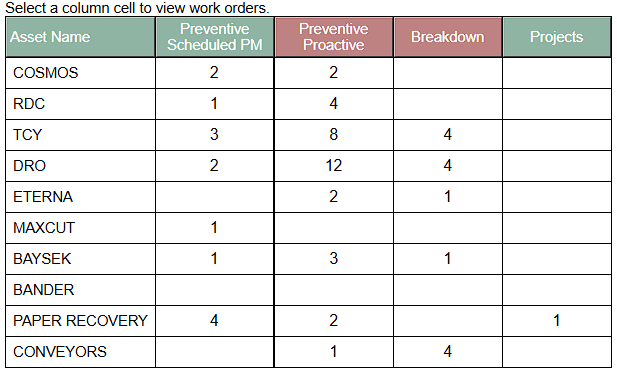
| Below is the results of this type of filtering. The goal is to never see breakdowns having a higher number than preventive. If you see breakdowns adding up like in the "Conveyors", you need to see how to change processes, add procedures or upgrade equipment to reduce the breakdowns. |
| |
 |
| |
| |
| |
| |
| |
| |
| |